
TrueWin registration is the simple process of creating your personal gaming account on this popular online gaming platform. Before you can enjoy the extensive collection of games and features, new players must complete secure account creation to verify their identity and establish their unique profile. This quick sign-up procedure ensures that your gaming experience remains personalized, secure, and tailored to your preferences, whether you are accessing from UAE, Australia, USA, or other supported regions.

The entire TrueWin sign up process takes only a few minutes and requires basic information to get started. Once your account is active, you gain immediate access to deposits, withdrawals, and the full game library. This guide walks you through everything you need to know about new player registration, from finding the correct form to verifying your details and making your first login.
What Is TrueWin Registration and Who Can Sign Up?
The TrueWin registration process is designed to establish your unique identity on the platform, ensuring that every player has a personalized and secure environment for gaming. By creating an account, you gain access to personalized features, transaction history, and exclusive promotions. Understanding who can register helps streamline your new player sign up experience and ensures compliance with basic account requirements.
What Creating a TrueWin Account Means
When you create a TrueWin account, you unlock the complete range of platform offerings. Your gaming account access includes:
- Full access to sports betting markets and casino games
- Ability to make deposits and withdrawals using ApplePay, PayBy, Botim, and other payment methods
- Eligibility for welcome bonuses and ongoing promotions, including the sign up bonus
- A personalized player dashboard to track activity, manage funds, and update preferences
- Secure storage of your payment methods and gaming history
Eligibility Requirements for New Players
Before beginning your registration, review these registration requirements to ensure you meet the account criteria:
- Minimum age requirement as specified by your jurisdiction ( 18 +)
- Valid email address that you can access immediately
- Active mobile phone number for verification purposes
- Agreement to the platform’s terms and conditions and privacy policy
- Provision of accurate personal information matching your identification documents
Age and Identity Verification Basics
As part of the KYC process, TrueWin performs age verification to maintain a secure gaming environment. This standard procedure protects both the platform and players from underage access and fraudulent activity. During identity verification, you may need to provide document examples such as a passport, driver’s license, or national ID card. These documents confirm your identity and age, ensuring compliance with regulatory requirements while keeping your account protected.
Before You Register – What You Need to Prepare
Taking a few moments to prepare before registration ensures a smooth and hassle-free sign-up experience. Having all your information ready prevents delays and helps you complete the form correctly the first time. Use this sign-up checklist to gather everything you need before starting your TrueWin account preparation.
- Stable internet connection on your device
- Valid email address you can access immediately
- Active phone number (UAE residents need a working mobile number)
- Your full legal name exactly as shown on official documents
- Emirates ID details (for UAE players) or other government ID information
- A strong password idea combining letters, numbers, and symbols

Required Personal Information
During registration, you will need to provide accurate personal details that match your official identification. This ensures smooth verification and prevents future withdrawal issues. Have these registration information items ready:
- Full name: First name, middle name(s), and last name exactly as on your ID
- Date of birth: Used for age verification and account eligibility
- Email address: For account communication and verification links
- EID Number: Emirates ID number for UAE residents
- Phone number: For SMS verification and account security alerts
Providing correct account details upfront helps avoid verification delays later.
Choosing a Strong Username and Password
Creating a secure username and strong password is your first line of defense against unauthorized access. Follow these account security tips:
Do:
- Create a unique username not used on other platforms
- Use a password with at least 12 characters including uppercase, lowercase, numbers, and symbols
- Consider using a passphrase that is easy to remember but hard to guess
Don’t:
- Never use personal information like birthdates or names
- Avoid common passwords like “123456” or “password”
- Do not reuse passwords from other websites
Email and Phone Verification Details
TrueWin requires email and phone number verification to confirm your identity and secure your account. After submitting your registration form, you will receive an OTP code via SMS to your provided phone number.
Enter this code on the website to verify your mobile. Simultaneously, check your email inbox for a confirmation link -clicking this activates your account. This two-step verification ensures that only you can access the account using your contact details and prevents unauthorized sign-ups using fake information.
Step-by-Step Guide to TrueWin Account Registration
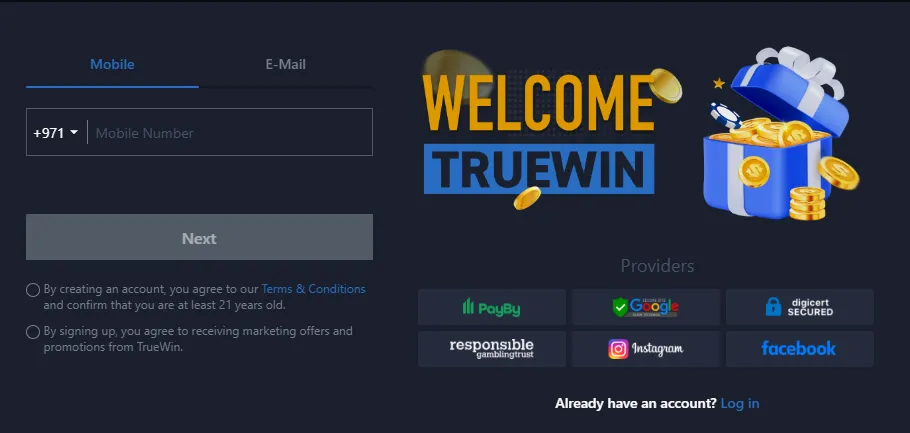
Creating a gaming account is very easy if you follow this Truewin sign up guide. The platform has developed a clear TrueWin registration process for new players, allowing them to complete all the steps to create an account in less than a minute. Just follow our step-by-step instructions:
- Visit the official TrueWin website and click the “Register” button displayed on the home page.
- Enter your email address or phone number in the first field, then complete the captcha verification and click the “Next” button.
- Set Identification Information by entering your first name, middle name, and last name exactly as they appear on your official documents.
- Enter your complete date of birth using the calendar selector or manual entry fields.
- Input your EID number carefully, double-checking for any typing errors to avoid verification delays.
- Review all entered information for accuracy before submitting your registration form.
- Complete the email or phone verification process using the OTP code or confirmation link sent to your contact details.
Your account is now active—log in using your credentials and complete your first deposit.
Registering Through the TrueWin Mobile App
For players who prefer gaming on the go, TrueWin mobile registration offers a seamless way to create your account directly from your smartphone. The app is available for Android devices, while iOS users can access the platform through a PWA that functions like a native application. Register via app to enjoy a faster, touch-optimized experience with all the same features as the desktop version.
- Download the TrueWin mobile app from the official website—Android users download the APK file, while iOS users install the PWA from Safari.
- Open the application on your device and select the “Sign Up” option from the main screen.
- Fill out the complete sign-up form with your personal details, including name, date of birth, and contact information.
- Enter the captcha code displayed on screen to verify you are not a robot.
- Double-check all entered information for accuracy before proceeding.
- Tap the “Submit Now” button to complete your registration.
- Verify your account through the OTP code sent to your phone or email confirmation link.
Your account is now ready—log in and start playing immediately.

Common Registration Errors and How to Fix Them
Even with careful preparation, you might encounter occasional hiccups during Truewin sign-up pr. Understanding these common registration issues helps you resolve them quickly and complete your account creation without frustration. Below are the most frequent errors and their simple solutions.
Username Already Taken:
- Problem: The username you selected is already in use by another player
- Solution: Choose an alternative variation by adding numbers, underscores, or slight modifications. Try combinations like your name plus birth year or favorite number until you find an available option.
Invalid Email or Phone Number:
- Problem: System rejects your contact details as improperly formatted
- Solution: Ensure your email includes the @ symbol and correct domain (.com, .net, etc.). For phone numbers, include the country code (e.g., +971 for UAE) without any spaces or special characters.
Password Strength Issues:
- Problem: Your password does not meet minimum security requirements
- Solution: Create a password with at least 8-12 characters including uppercase letters, lowercase letters, numbers, and special symbols. Avoid common words or sequential patterns.
Technical Errors During Sign-Up:
- Problem: Page freezes, form won’t submit, or timeout occurs
- Solution: Refresh your browser page or close and reopen the app. Clear cache and cookies, ensure you have the latest app version installed, or try switching to a different device or browser.
Email and Phone Verification – Activating Your Account
Account activation is the essential final step that verifies your identity and secures your profile. This verification process protects against unauthorized access and ensures only you can control your account. Completing both email and phone confirmation activates your TrueWin account for deposits and gameplay.

Confirming Your Email Address
After registering, check your inbox for the email confirmation message containing your activation link. Click this link immediately to verify your address. If the email doesn’t appear, check your spam or junk folder before requesting a new one.
SMS Verification Code Process
You will receive an SMS verification containing a unique OTP code entry. Enter this 6-digit code in the provided field on the platform. The OTP code expires within 5-10 minutes, so complete this step promptly to avoid requesting a new code.
What to Do If You Don’t Receive the Code
If the OTP is not received, first click “Resend Code” after 60 seconds. Verify your phone number includes the correct country code. For persistent verification issues, contact customer support for manual assistance completing your activation.
After Registration – What to Do Next
Congratulations on successfully creating your account! Now that your registration is complete, taking a few key after registration steps will prepare you for the full TrueWin experience. This new account setup phase involves logging in, securing your profile, funding your balance, and claiming your rewards. Follow these first steps to transition from registered user to active player seamlessly.
Logging Into Your New Account
Now you can access your account at any time and start playing for real money. To do this, simply open the TrueWin login page and enter the username and password you created during registration. Use the same credentials on both desktop and mobile platforms. Bookmark the login page for easy access to your account in the future.

Completing Profile Information
Enhance your Truewin account security and preferences by updating your profile. Set your preferred language and currency. Enable two-factor authentication (2FA) for added protection. Complete any remaining account verification details to ensure smooth withdrawals later.
Making Your First Deposit

To start playing for real money, make your first deposit using available payment methods. Choose from ApplePay, digital wallets, or cash transactions via Botim or PayBy. Local bank transfers are also accepted. The minimum deposit is AED 60 (or equivalent in your currency).
Claiming a Welcome Bonus
Don’t forget to claim your welcome bonus! Simply select your preferred bonus offer when making your first deposit. New players can receive free spins for the Cherry Pop slot game plus other registration bonuses. Choose your bonus, make the qualifying deposit, and the rewards will be credited automatically.

Is TrueWin Registration Safe? Security and Data Protection Explained
As we mentioned above, TrueWin pays special attention to player safety and protects your information from the moment you register.
- SSL Encryption: All data transmitted during registration and login is secured with 128-bit SSL encryption, preventing unauthorized interception
- Data Protection: Your personal information is stored on secure servers with restricted access and never shared with third parties without consent
- Password Safety: Passwords are hashed and stored using advanced algorithms, ensuring even internal staff cannot view your credentials
- Responsible Gaming: TrueWin promotes safe play with deposit limits, self-exclusion options, and reality check tools built into every account
Final Thoughts
In conclusion to our guide, we can confidently say that creating a new TrueWin account is very simple and will be easy to understand even for beginners. This TrueWin registration guide has walked you through each stage, from preparation to verification and beyond. Remember that taking time to create a gaming account safely with accurate details and strong security measures protects your experience long-term. Set up your profile carefully, enable available security features, and always play responsibly. Your account is now ready—enjoy the entertainment awaiting you.