
Truewin login is the only way to access your personal account and start placing bets and playing casino games. The platform developers have worked out several options for logging into your TrueWin account, adapted for both mobile and desktop users. This means that you can use the services of the online casino and sportsbook wherever you are.

To ensure the most secure login process possible, we use reliable measures to protect your personal information on both the website and in the TrueWin app. In the following sections of our TrueWin login guide, you will find detailed instructions for each method of accessing the system, as well as important tips to help you make your gaming experience enjoyable and safe.
Why Login Security Is Critical for Online Gaming
Logging into your account gives you access not only to sports betting and slots, but also to your confidential data. In the digital world, neglecting login security can expose you to significant risks, so it is essential to pay close attention to account access security from the outset. Cybercriminals actively attack gaming platforms to steal financial and personal identification information, which means that a weak password or a careless click can have serious consequences.
Therefore, your TrueWin login may result in the following risks:
- Financial Theft: Compromised accounts can lead to unauthorized deposits or withdrawals, draining your linked funds.
- Identity Fraud: Hackers can use your personal information to open fraudulent accounts or commit other crimes in your name.
- Phishing Attacks: Deceptive emails or websites may trick you into revealing your TrueWin login credentials, giving scammers direct access.
- Account Takeover: Without robust security, unauthorized users can lock you out of your own account, change details, and disrupt your gaming experience.
How TrueWin Protects User Credentials
To counter these threats, TrueWin employs a comprehensive security framework designed to safeguard your information. The foundation of this protection is an encrypted login system that uses advanced data encryption to scramble your credentials as they travel between your device and the servers, making them unreadable to interceptors. This ensures that your username and password remain confidential during every session.
- Secure Authentication: Multi-layer verification processes confirm your identity before granting access.
- Session Monitoring: The platform actively tracks login sessions for unusual activity, automatically flagging or terminating suspicious connections.
- Data Encryption: All sensitive information stored on TrueWin’s servers is encrypted, ensuring it remains protected even in the unlikely event of a data breach.
- Privacy Protection: Strict internal policies govern how your data is handled, ensuring it is never shared without your explicit consent.
Step-by-Step Guide to Logging Into Your TrueWin Account
Now that you understand the importance of secure authentication, we can proceed with the TrueWin login process. By following these step-by-step instructions, you are guaranteed to gain access to your personal account. If you are a registered Truewin user, please follow these simple steps:

1. Open the Login Page
First, visit the official TrueWin Bet website and select the login option located at the top right of the home page. This will activate the login form, which you will need to fill out.
2. Enter Your Credentials Correctly
Select the authorization method (via email or phone number) and enter your login credentials. Make sure you enter the correct username and password that you specified and created during registration.
3. Access Your Gaming Dashboard
Finally, click the blue Log In button to access your Truewin personal account. The system will process your data in an instant, and you can start playing.
Why You Can’t Log In – Common TrueWin Login Problems
TrueWin login roblems become particularly annoying when you want to place a bet and there isn’t much time left.. The good news is that most sign-in issues are common and easily fixable without contacting support. Whether you are facing a login error due to mistyped credentials, technical glitches, or account status changes, understanding the root cause helps you resolve it quickly. Below are the most frequent reasons players experience trouble accessing their accounts and simple solutions to get you back online.
Incorrect Username or Password
The most frequent cause of login errors is entering wrong user credentials. Double-check your username and password for typos, including accidental spaces or incorrect capitalization. If you have forgotten your credentials, use the “Forgot Password” link to reset them immediately and regain access.
Account Suspension or Verification Pending
Your Truewin account may be temporarily suspended or require account verification to proceed. This often happens during KYC verification checks or if unusual activity was detected. Check your registered email for instructions from TrueWin and complete any pending verification steps to restore full access.

Browser Cache or Technical Errors
Sometimes a login technical issue stems from your browser storing outdated information. Try clearing browser cache and cookies, or switch to a different browser or device. This simple step often resolves sign-in error fix issues caused by corrupted temporary data.
Geo-Restriction or Access Limitations
TrueWin may enforce regional access restrictions based on your location. If you are traveling or living in a restricted area, you may encounter a location-based login block. Contact customer support to confirm whether geo restriction issues apply in your region and explore available solutions.
TrueWin Mobile Login – Accessing Your Account via App or Browser
The TrueWin App provides the most streamlined mobile experience with quick authentication and biometric login options. Follow these simple steps to access your account:
- Step 1: Download the TrueWin app from the official website and install it on your device.
- Step 2: Open the application on your smartphone and tap the “Log in” button prominently displayed on the main screen.
- Step 3: Enter your registered username and password in the designated fields, double-checking for any typing errors.
- Step 4: For enhanced security on supported devices, enable biometric options like fingerprint or face recognition when prompted—this allows faster future access.
After successful app authentication, you will be automatically directed to your personalized dashboard where all games and features are readily available.

Browser-Based Login on Android and iOS
If you prefer not to download applications, accessing TrueWin through your mobile browser is equally convenient. To do this, follow these steps:
- Open your mobile browser (e.g., Safari or Chrome).
- Go to the official TrueWin website. The site will automatically load a responsive version optimized for touch control.
- Tap the login icon in the upper corner.
- Enter your credentials exactly as they were registered.
- Click on the login button again for instant account access.
Once authenticated, the browser may offer to save your login details securely – use this feature cautiously on private devices only. Your account is now ready for gaming directly through the browser.
Forgot Password? How to Find Your TrueWin Account
Forgetting your password is a common hurdle, but TrueWin offers a straightforward TrueWin password reset process to help you recover your gaming account quickly. Whether you prefer email or SMS verification, the platform provides multiple options to verify your identity and restore access. The secure recovery process ensures that only you can reset your login details, protecting your account from unauthorized changes while getting you back to gaming with minimal delay.
Resetting Your Login Credentials Securely
Follow these account recovery steps to complete a secure password change:
- Open the TrueWin login screen and select the “Forgot Password” option.
- Choose your preferred recovery method—either Mobile or Email—to find your account.
- Enter the email address or phone number you provided during registration.
- Complete the captcha verification to confirm you are not a robot.
- Check your email or SMS for a 6-digit verification code and enter it in the designated field.
- Complete the second captcha verification for enhanced security.
- Create a strong new password and click “Next” to finalize your reset authentication.
That’s it. You can now enter your account with your new credentials and start playing right away.
How to Register on TrueWin and Start Playing
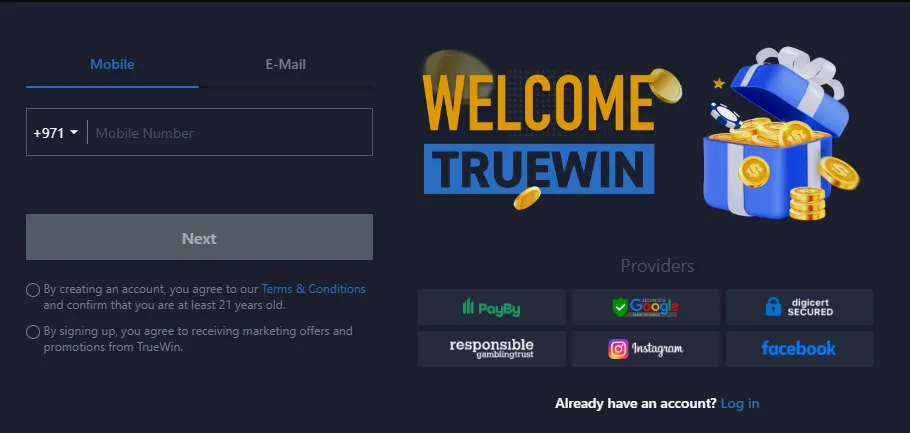
Before you can use TrueWin login, you need to create your gaming account. The TrueWin registration process is designed to be quick and user-friendly, getting you from visitor to player in just a few minutes. Once your account is active, the same credentials you create during sign-up will be used for all future logins. Follow these simple steps to complete your sign up process and unlock access to the full gaming experience.
- Visit the official TrueWin website or open the mobile app on your device.
- Click the “Register” button, typically located near the login area on the homepage.
- Fill out all fields of the registration form with your required information, including name, email, and preferred currency.
- Complete the sign up process by verifying your details and submitting the form.
- Activate your new account through the verification link sent to your email or SMS.
Now you can make a deposit, select your favorite game, and start playing and winning with TrueWin Casino
Two-Factor Authentication and Extra Security Layers
For players seeking enhanced account protection, two-factor authentication adds a vital extra login protection layer beyond your standard password. This secure authentication layer requires a second verification step, typically a temporary code sent to your mobile device, ensuring that stolen passwords alone cannot grant access to your account. While TrueWin already implements robust encryption, enabling 2FA provides proactive defense against unauthorized entry. Understanding this feature and implementing additional safety measures helps you maintain complete control over your gaming experience and sensitive information.
Does TrueWin Use 2FA?
Yes, TrueWin offers two-factor authentication as an available security feature for all registered players. While not mandatory for basic account access, enabling 2FA is strongly recommended to safeguard your funds and personal data. The login verification process becomes more rigorous, requiring both your password and a unique code generated specifically for each session. This ensures that even if someone obtains your login credentials, they cannot access your account without physical possession of your authentication device.
How to Enable Extra Login Protection
Activating this secure authentication layer takes only a few minutes through your account settings:
- Log in to your TrueWin account and navigate to the “Account Settings” section.
- Locate the Two-Factor Authentication option and click “Enable”.
- Choose your preferred verification method – SMS or an authenticator app like Google Authenticator.
- Follow the on-screen instructions to scan a QR code or verify your phone number.
- Enter the confirmation code generated to complete the setup and activate 2FA for all future logins.
Tips for Keeping Your Gaming Account Safe
Beyond enabling two-factor authentication, adopt these safe login practices to prevent unauthorized access:
- Create strong, unique passwords combining letters, numbers, and special characters—avoid reusing passwords across different platforms
- Never share your login credentials with anyone, including friends or individuals claiming to be support staff
- Log out completely after each session, especially when using shared or public devices
- Regularly monitor your account activity for any unfamiliar transactions or changes
- Keep your registered email and phone number updated to receive important security notifications
- Be cautious of phishing attempts – always verify you are on the official TrueWin website before entering credentials
Conclusion
Completing teh TrueWin login process is the first step toward enjoying a premium online gaming experience. Whether you choose desktop or mobile access, the platform ensures you can access your account securely through multiple convenient methods while maintaining robust protection for your personal information.

Remember to always follow safe gaming practices by using strong passwords and never sharing your credentials. If you encounter any difficulties during the sign-in process, the TrueWin support team is available 24/7 to assist you. Stay safe, play responsibly, and enjoy everything this safe gaming platform has to offer.